
Web UI
KarhutlaSQL ships a small browser UI for people who just want to run a query, look up a table, or check what is running — no client to install.
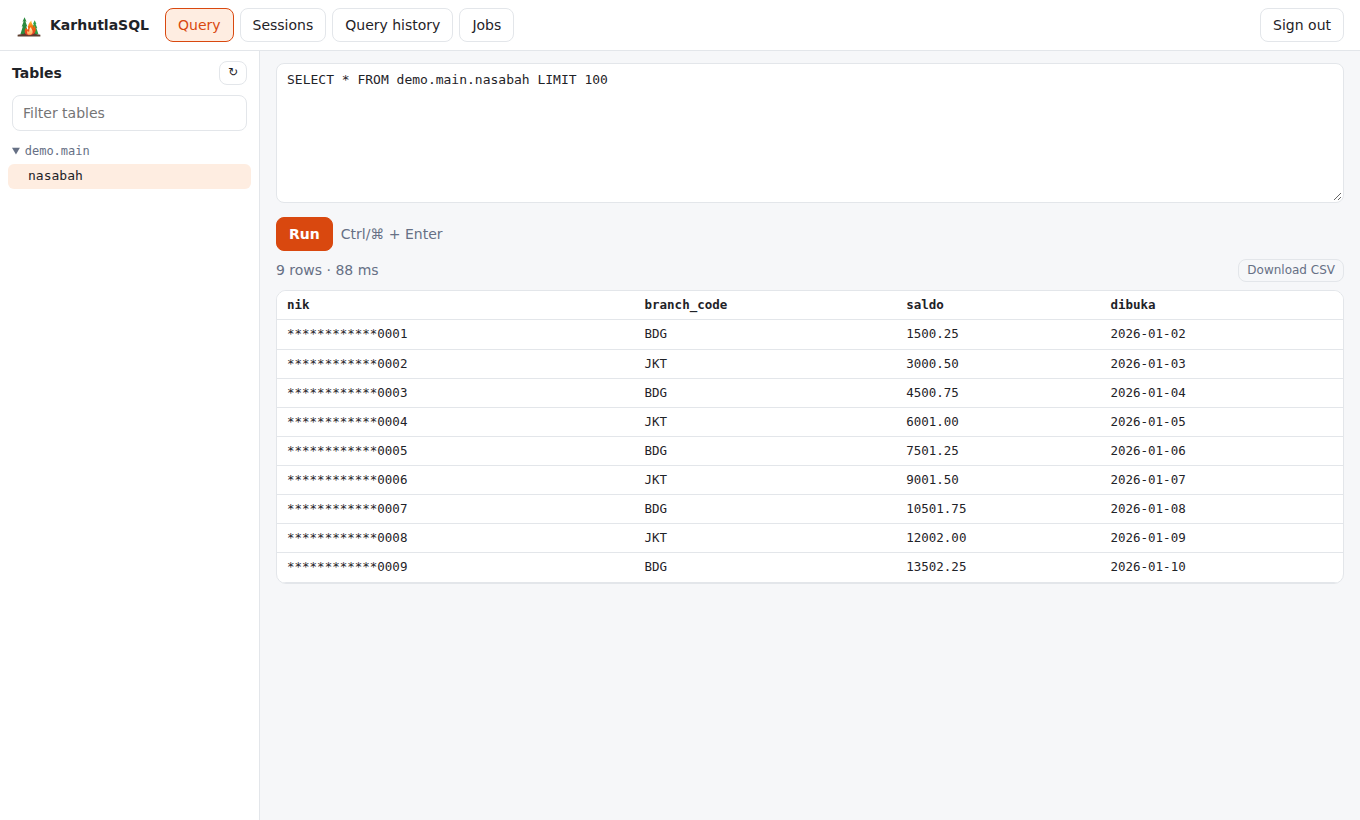
It is served at / on the HTTP port and is enabled by default whenever --http-port is set:
karhutlasql-server ... --http-port 8444 --tls-cert server.crt --tls-key server.key
# open https://kq.bank.local:8444/
Turn it off with --http-ui=false (the HTTP API keeps working).
What it does
| View | Contents |
|---|---|
| Query | Tables you may read (from Flight SQL metadata, already filtered by your privileges), a SQL editor (Ctrl/⌘ + Enter to run), results with row count and timing, Cancel, and CSV download |
| Sessions | karhutla_sessions() — admins see everyone and can kill a session; others see their own |
| Query history | karhutla_query_history() — the last statements with status, queue and execution time |
| Jobs | karhutla_jobs() — scheduled jobs with their next run and last result; admins can run a job now |
Results show up to 1,000 rows on screen; the CSV download contains the whole result.
Security
The UI has no data path of its own. It calls the same endpoints any client can — POST /api/v1/login, GET /api/v1/tables, and POST /api/v1/query — so privileges, masking, row filters, quotas, audit (channel http), and access history apply exactly as for Flight SQL. A masked column is masked in the browser too.
- Sign-in: local user + password (exchanged once for a token by
POST /api/v1/login; the password is never stored), or paste an OIDC access token from your IdP ("SSO token"). - Token storage: the browser tab's
sessionStorage, cleared when the tab closes or on Sign out. Tokens expire after--jwt-ttland can be killed like any session. - Headers: a strict Content-Security-Policy (only the server's own scripts, no inline scripts or
eval, no external connections), no framing (X-Frame-Options: DENY),nosniff, and no referrer. - Cancel closes the HTTP request, which cancels the statement on the server.
- Serve it over TLS in production (
--tls-cert/--tls-key): passwords and tokens travel in the request headers.
Limits
- One statement per run; no transactions (autocommit).
- No in-browser SSO redirect yet — sign in with a password or paste a token.
- Display formatting is simple: decimals, dates, and timestamps (UTC) are formatted; lists and structs are shown as JSON.
Developing the UI
The source is a Vue 3 app in web/; the build output in internal/webui/dist is committed and embedded into the server binary, so a plain go build needs no Node.js.
make webui                      # npm ci + vite build → internal/webui/dist
npm --prefix web run dev        # dev server with /api proxied to 127.0.0.1:8444