
14. The web UI
Goal: query KarhutlaSQL from a browser — browse tables, run SQL, download results, and watch or kill sessions — with exactly the same masking, privileges, and audit as every other client.
You will learn
- how to turn the UI on (
--http-port) and off (--http-ui=false) - how to sign in with a password or with an SSO token
- how to run, cancel, and export queries, and use the Sessions, Query history, and Jobs views
- which API calls the UI makes, and how it is protected
Prerequisites
- The binaries from the Quick start and a browser.
curlfor the API steps.
The outputs below come from a real run; only the ports were changed to the defaults used throughout these tutorials, and session IDs, tokens, and timings will differ for you.
Step 1 — Start the server with the HTTP port
Use a policy whose admin role has no unmask, and classify the NIK column, so you can see masking in the browser:
# policy.yaml
default: deny
roles:
  admin:
    catalogs: { "*": [read, write, admin] }   # no unmask → NIK stays masked
subjects:
- { match: { user: admin }, roles: [admin] }# classification.yaml
tags:
pii.nik: { mask: partial, keep_last: 4 }
columns:
demo.main.nasabah.nik: pii.nikexport KARHUTLASQL_PASSWORD='rahasia'
karhutlasql-server --username admin --database-filename demo.duckdb \
--policy-file policy.yaml --classification-file classification.yaml --four-eyes=false \
--http-port 8444The log confirms the UI is on:
{"level":"INFO","msg":"http query endpoint enabled","port":8444,"allowed_origins":[],"web_ui":true}Load some data (any client works; here the CLI):
karhutlasql-client <<'SQL'
CREATE TABLE nasabah (nik VARCHAR, nama VARCHAR, telepon VARCHAR, branch_code VARCHAR, saldo DECIMAL(18,2));
INSERT INTO nasabah VALUES
  ('3171012345678901','Ani','081234567890','JKT',15000000),
  ('3273019876543210','Budi','081298765432','BDG',7250000),
  ('3578011122334455','Citra','081311122233','SBY',42000000);
SQL
Production
Add --tls-cert/--tls-key so the UI is served over HTTPS — passwords and tokens travel in request headers.
Step 2 — Sign in
Open http://127.0.0.1:8444/. The sign-in form has two modes:
- Password — the local user. A wrong password shows
invalid credentials; the right one is exchanged once for a token and the password is not kept. - SSO token — paste an OIDC access token from your IdP (for example the one the CLI stores after
--oidc-login). An invalid, expired, or killed token returns you to the sign-in form.
Step 3 — Browse and query
The sidebar lists the tables you may read (here: demo.main → nasabah). Click a table to run SELECT * FROM demo.main.nasabah LIMIT 100:
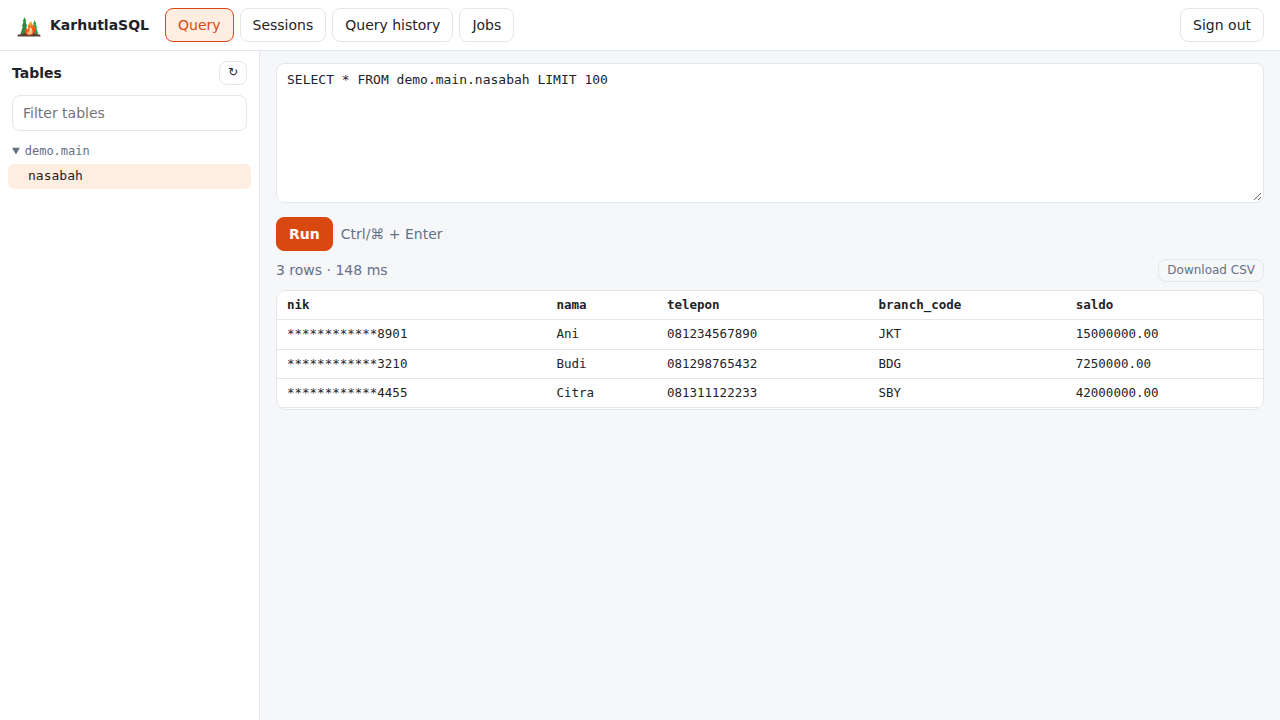
3 rows · 148 ms
nik              | nama  | telepon      | branch_code | saldo
************8901 | Ani   | 081234567890 | JKT         | 15000000.00
************3210 | Budi  | 081298765432 | BDG         | 7250000.00
************4455 | Citra | 081311122233 | SBY         | 42000000.00
The NIK is masked in the browser too — the UI receives the same governed result as any client. Type your own SQL and press Ctrl/⌘ + Enter:
SELECT branch_code, count(*) AS nasabah, sum(saldo) AS total FROM nasabah GROUP BY 1 ORDER BY 1BDG | 1 | 7250000.00
JKT | 1 | 15000000.00
SBY | 1 | 42000000.00Download CSV saves the whole result (not just the rows on screen) as result.csv, masked values included:
nik,nama,telepon,branch_code,saldo
************8901,Ani,081234567890,JKT,15000000.00
************3210,Budi,081298765432,BDG,7250000.00
************4455,Citra,081311122233,SBY,42000000.00
Step 4 — Cancel a long query
Run something slow:
SELECT count(*) FROM range(1000000000000) t(i) WHERE i % 7 = 3A Cancel button appears next to Run. Clicking it closes the HTTP request, and the server cancels the statement — Query history (step 6) shows it with status Canceled.
Step 5 — Sessions: see and kill
The Sessions tab runs karhutla_sessions(). As an admin you see every session; others see only their own:
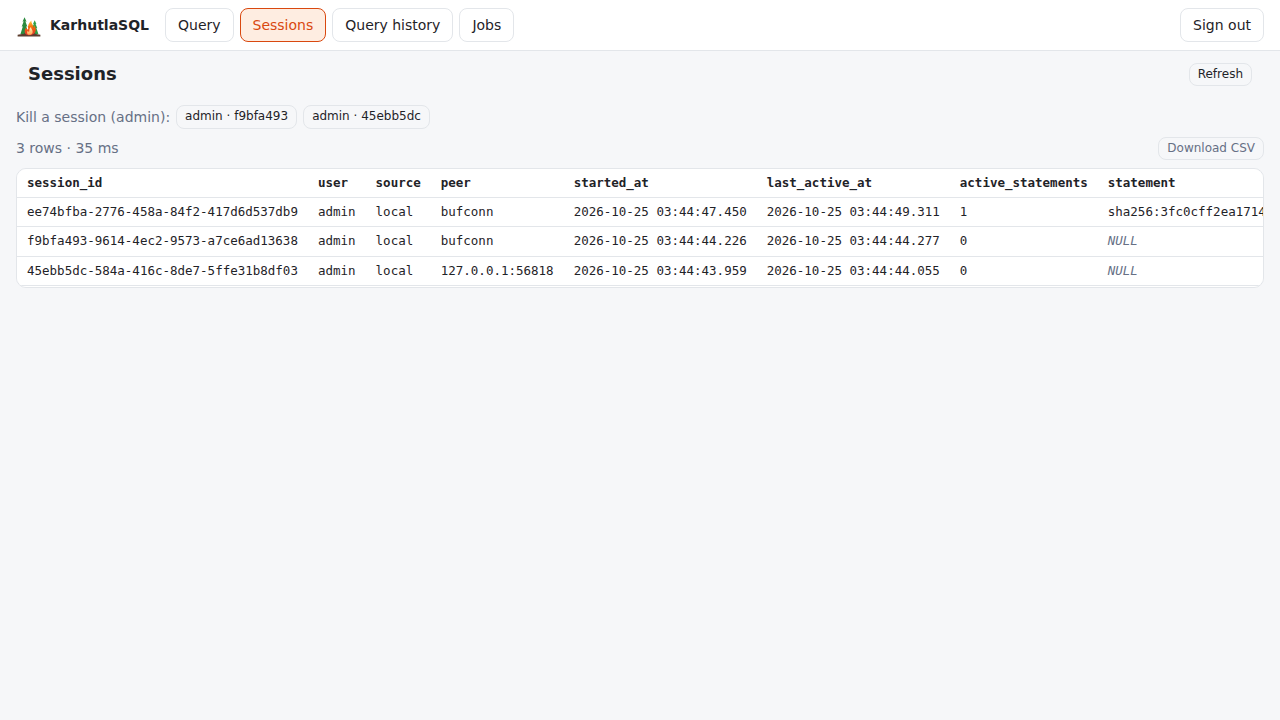
3 rows · 35 ms
session_id  user   peer             active_statements  current
ee74bfba…   admin  bufconn          1                  true
f9bfa493…   admin  bufconn          0                  false
45ebb5dc…   admin  127.0.0.1:56818  0                  false
peer is bufconn for UI and HTTP API sessions: they reach Flight SQL inside the server. Admins get a Kill a session button for every session except their own. After confirming:
Session f9bfa493-9614-4ec2-9573-a7ce6ad13638 killed.A killed session's token stops working everywhere. That session belonged to the curl token from step 7, which now gets:
{"error":"session killed"}
 401
Killing sessions needs a role named admin; with another role name the UI shows permission denied: karhutla_kill_session requires role admin.
Step 6 — Query history and jobs
Query history (karhutla_query_history()) shows the latest statements with user, status, queue and execution time, rows, and the SQL (or its SHA-256 unless --audit-log-sql is set):
8 rows · 32 ms
user   kind   status    duration_ms  rows  statement
admin  query  OK        10           2     sha256:3fc0cff2ea1714f…
admin  query  OK        4            1     sha256:31a227c9f2710ca…
admin  query  OK        7            3     sha256:3fc0cff2ea1714f…
admin  query  Canceled  892          0     sha256:9b0838907a6eb78…
Jobs (karhutla_jobs(), admin) lists scheduled jobs with their next run and last result, and offers Run now buttons. Without --jobs-file it shows 0 rows.
Sign out clears the token from the tab.
Step 7 — The API behind the UI
The UI has no data path of its own; it uses three endpoints any application can call:
curl -s -X POST -u admin:rahasia http://127.0.0.1:8444/api/v1/login{"token":"eyJhbGciOiJIUzI1NiIsImtpZCI6IjQ3OTFmOWVlIiwidHlwIj…"}TOKEN=$(curl -s -X POST -u admin:rahasia http://127.0.0.1:8444/api/v1/login | jq -r .token)
curl -s http://127.0.0.1:8444/api/v1/tables -H "Authorization: Bearer $TOKEN"[{"catalog":"demo","schema":"main","name":"nasabah","type":"BASE TABLE"}]curl -s -X POST -u admin:salah http://127.0.0.1:8444/api/v1/login -w ' %{http_code}\n'{"error":"invalid credentials"}
401Queries go to POST /api/v1/query and come back as Arrow — see Tutorial 12 and the HTTP API.
Step 8 — Security headers
curl -sI http://127.0.0.1:8444/HTTP/1.1 200 OK
Cache-Control: no-cache
Content-Security-Policy: default-src 'self'; script-src 'self'; style-src 'self'; img-src 'self' data:; connect-src 'self'; font-src 'self'; object-src 'none'; base-uri 'none'; form-action 'self'; frame-ancestors 'none'
Content-Type: text/html; charset=utf-8
Referrer-Policy: no-referrer
X-Content-Type-Options: nosniff
X-Frame-Options: DENYOnly the server's own scripts run — no inline scripts, no eval, no connections to other origins — and the page cannot be embedded in a frame.
Step 9 — Turn the UI off
Restart with --http-ui=false. The API keeps working; the UI is gone:
curl -s -o /dev/null -w '/ -> %{http_code}\n' http://127.0.0.1:8444/
curl -s -X POST -u admin:rahasia -o /dev/null -w 'login -> %{http_code}\n' http://127.0.0.1:8444/api/v1/login
/ -> 404
login -> 200What just happened
- The server serves a small Vue app, embedded in the binary, at
/on the HTTP port. - Signing in exchanged your password for a token (
POST /api/v1/login), kept only in the browser tab. - Every view is a query through
POST /api/v1/query, which becomes a Flight SQL statement with your identity (audit channelhttp). Masking, privileges, quotas, and the access history applied exactly as for the CLI — the NIK never reached the browser unmasked. - Cancel closes the request; the server cancels the statement. Killing a session revokes its token everywhere.
Details: Web UI.